No, you don't. You can shop quickly and conveniently with us even without registering—simply as a guest. However, registering will make future purchases easier and allow you to keep track of your orders.
Customer Account and Discounts
The search term was also found in:
1. The easiest way to register is to click on the following text link, which will take you directly to the registration page.YOU CAN REGISTER HERE
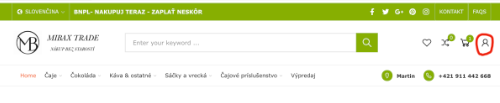
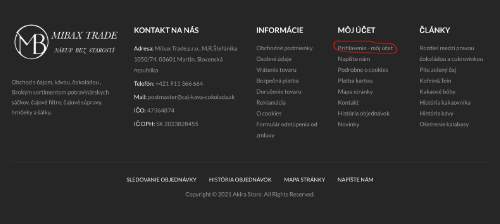
2. Before placing an order, click the red ICON in the upper right corner of the homepage or the text labeled MY ACCOUNT at the bottom of the page.


3. Shop at your leisure, add the items you wish to purchase to your cart, and proceed by clicking the CHECKOUT button. You will be redirected to a page where you will fill in all the required information marked with an asterisk. After entering your email address and password, an account will be automatically created for you. On this page, you can also complete your order and register and submit your order with a single click.
On your next visit to the online store, all you need to do is log in (enter your email address and password) and you can start shopping. After registering, you’ll be able to view the status of your orders, all invoices, track your Wish List, or edit your profile at any time.
No problem. In the login section, click “Forgot Password,” enter your email address, and we’ll send you a link to create a new password right away.
Select a product from our range. Products are divided into categories and subcategories according to type of goods.
If you are looking for a specific product, enter its name in the search engine.
There are two ways to add goods to your shopping cart: The first way is to click on the product details and then simply click on the "Add to cart" button. This will automatically add the goods to your shopping cart, the icon for which can be found in the upper right corner, showing the quantity of products and their price. Clicking on the icon will display the shopping cart with the added products, and you can proceed to checkout or return to the store and continue shopping.
The second way to purchase goods is to first add them to your Wish List by clicking on the text Add to Wish List (below the Add to Cart button). This way, the goods are not stored directly in the shopping cart but remain in the Wish List. After you have finished selecting the goods you are interested in, click on the heart in the upper right corner next to the text YOUR ACCOUNT to open the Wish List. There you will find all the items you were interested in and you can decide which ones to purchase by selecting Add to cart.
By clicking on CHECKOUT, you will open a page where you can fill in your delivery and billing information, select a carrier and payment method. The last step is to mandatorily agree to the Terms and Conditions and submit your order by clicking on ORDER WITH PAYMENT OBLIGATION.
A message will be sent to your email address with a summary of your order, including payment instructions if you have chosen to pay by bank transfer. The order is shipped after the payment has been credited to our account.
Simply enter the code in the “Discount Code” field in the first step of the shopping cart and click “Apply.” The discount will be deducted from the price immediately.
If you no longer wish to receive our updates, simply click the “Unsubscribe” link at the very bottom of every email you receive from us.
No question matches your search.
Did not find the answer to your question?