



























Frequently Asked Questions

Select a product from our range. Products are divided into categories and subcategories according to type of goods.

If you are looking for a specific product, enter its name in the search engine.

There are two ways to add goods to your shopping cart: The first way is to click on the product details and then simply click on the "Add to cart" button. This will automatically add the goods to your shopping cart, the icon for which can be found in the upper right corner, showing the quantity of products and their price. Clicking on the icon will display the shopping cart with the added products, and you can proceed to checkout or return to the store and continue shopping.

The second way to purchase goods is to first add them to your Wish List by clicking on the text Add to Wish List (below the Add to Cart button). This way, the goods are not stored directly in the shopping cart but remain in the Wish List. After you have finished selecting the goods you are interested in, click on the heart in the upper right corner next to the text YOUR ACCOUNT to open the Wish List. There you will find all the items you were interested in and you can decide which ones to purchase by selecting Add to cart.

By clicking on CHECKOUT, you will open a page where you can fill in your delivery and billing information, select a carrier and payment method. The last step is to mandatorily agree to the Terms and Conditions and submit your order by clicking on ORDER WITH PAYMENT OBLIGATION.

A message will be sent to your email address with a summary of your order, including payment instructions if you have chosen to pay by bank transfer. The order is shipped after the payment has been credited to our account.

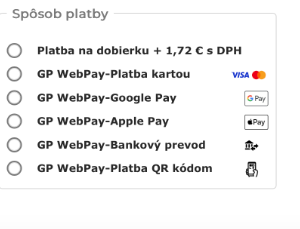
payment

Cash on Delivery - You pay for your order to the courier upon delivery, either in cash or by credit card. A cash on delivery fee applies based on the weight of the package and the total amount of your order.

In partnership with GPWebPay, we offer our customers a DEFERRED PAYMENT service. In short, this means you don’t have to pay the full order price immediately; instead, you can spread it out over three installments, all without any price increase. This option is available for all GP WebPay payment types. You can learn more about tthis service at this link.

Other payments are processed through GP WebPay, the most widely used payment gateway in the Czech Republic and Slovakia.

Payment by credit or debit card via the GPWebPay portal. After clicking the ORDER WITH PAYMENT OBLIGATION button, a summary page will open, and you will be redirected to the secure GPWebPay page. Follow the instructions. 

You do not need a credit card to pay via QR code—simply scan the QR code and confirm the payment in your banking app.

Payment by bank transfer can be made via the GPWebPay payment gateway. After being redirected to the payment gateway, select your bank and make the payment directly from your bank account. 

Google Pay and Apple Pay are virtually identical contactless payment services that differ mainly in the devices they work on and minor details regarding user experience. Both options are extremely secure and use NFC technology.

Apple Pay works exclusively on Apple devices (iPhone, Apple Watch), while Google Pay (or the Google Wallet app) is designed for Android smartphones and smartwatches.

We process orders in the order in which they are received and depending on the current stock status of individual items. Orders are usually shipped within 48 hours. Items that are currently unavailable are processed in consultation with the customer.

If any item from the order is out of stock, we will immediately inform you of the possible date of shipment of the entire order or part of the order.

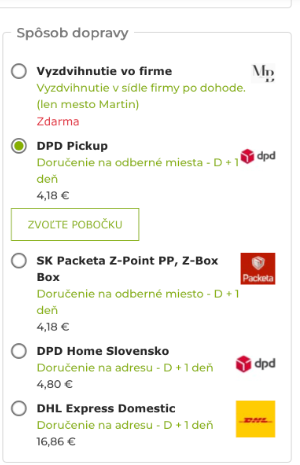
For delivery within the Slovak Republic, we offer the following shipping companies:

carrier

Deliveries to European and non-European countries are carried out through Packeta's contractual partners or DHL Express Worldwide services.

For orders dispatched from our shop, we have a standard delivery time of 2–7 days. However, we usually dispatch orders within 24 hours of receiving them. The estimated delivery time is specified for each carrier.

In the event of items being out of stock or unforeseen circumstances that may delay delivery, we will immediately notify the customer by email, stating the estimated dispatch date.

1. The easiest way to register is to click on the following text link, which will take you directly to the registration page.YOU CAN REGISTER HERE 

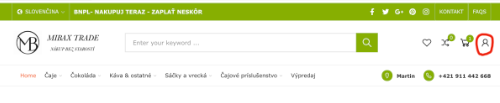
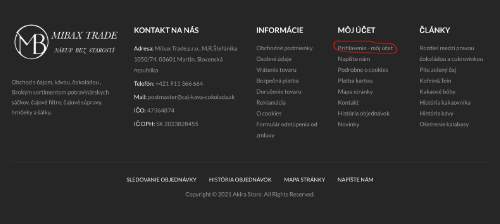
2. Before placing an order, click the red ICON in the upper right corner of the homepage or the text labeled MY ACCOUNT at the bottom of the page.

log in

my account

3. Shop at your leisure, add the items you wish to purchase to your cart, and proceed by clicking the CHECKOUT button. You will be redirected to a page where you will fill in all the required information marked with an asterisk. After entering your email address and password, an account will be automatically created for you. On this page, you can also complete your order and register and submit your order with a single click.

On your next visit to the online store, all you need to do is log in (enter your email address and password) and you can start shopping. After registering, you’ll be able to view the status of your orders, all invoices, track your Wish List, or edit your profile at any time.

See all questions

Megamenu
Compare0My wishlist0
Your cart
There are no more items in your cart